Most people are using ChatGPT like a smarter Google. Ask a question. Take the first answer. If it misses, try “less robotic,” “shorter,” or whatever instruction might rescue it. A few rounds later, you are stitching together pieces from four versions and the five-minute task has eaten half an hour.
With AI sitting one tab away, access is not the issue. What most people were never taught is the difference between prompting the tool and thinking with it. Prompting asks for an output. Thinking with AI means supplying context, defining a useful result, choosing the right tool, and carrying each lesson into the next run.
Skip that part, and AI creates work around the work. Researchers call the mental drain “AI brain fry.” A study highlighted by Harvard Business Review found that workers overseeing multiple AI tools experienced 12% more mental fatigue. AI was supposed to take thinking off your plate. Without a workflow, it becomes a second job supervising the first.
Here is what the 10% figured out: the blank chat is the problem. They do not make the tool guess what matters, and they do not throw away everything they learned when an answer misses. The context, the standard for a good result, and the correction all stay with the work. Everyone else starts over and blames AI.
How AI Tools Find Information
AI answers do not all come from the same place. Depending on the setup, a tool may pull from three very different places:
- Internal retrieval: Training teaches an AI model patterns from a huge body of information. It can recall those patterns instantly, but it is not checking whether they are current.
- Live search: Live web access lets a tool fetch fresh information. Useful, yes. Verified, no. You still need to inspect the sources.
- Tool calls: Smart matching finds related ideas instead of waiting for an exact keyword. That is how a tool can surface the right file even when you cannot remember what it was called.
Where does some of the AI mental fatigue come from? AI often makes wrong or unverifiable claims because silence is not really what the model was built for. Its job is to keep predicting the next likely answer, and a wrong one is more likely than none.
If the source material leaves a hole, the model may keep going and fill it with a fact that sounds perfectly reasonable. That confident invention is a hallucination, so read answers intentionally and trust it cautiously!
While AI sources information from different places, there’s one thing you can do to make sure you always end up with a useful answer.
How to Get Better Outputs From Your AI Tool
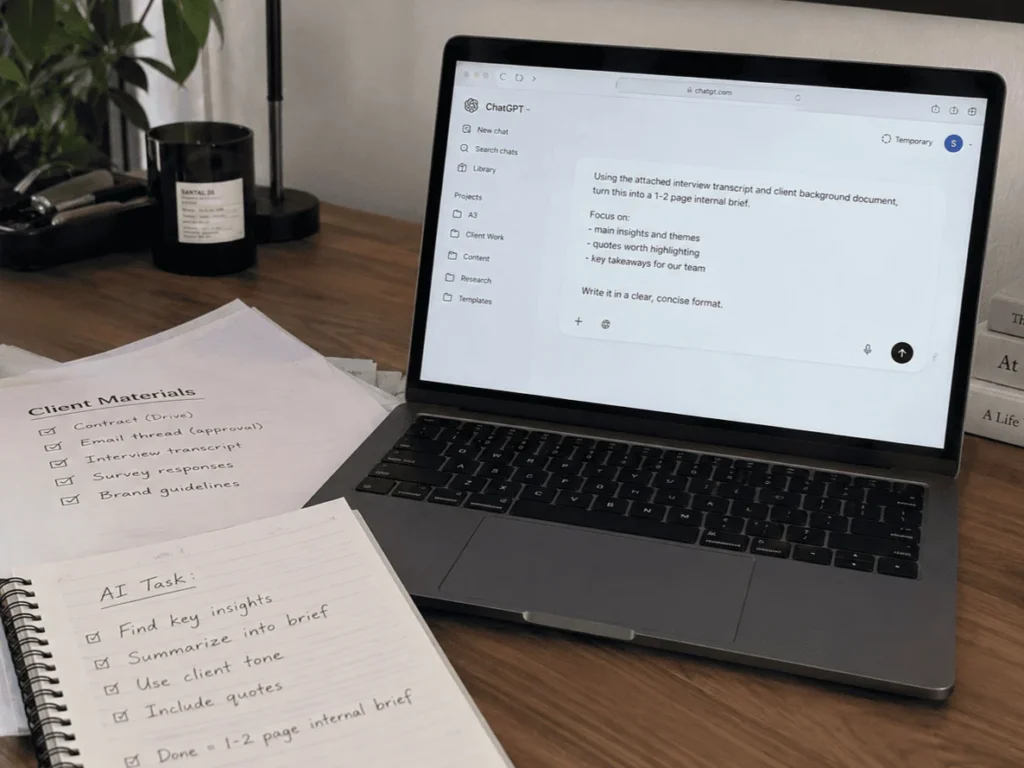
AI earns its keep only with source material and a clear finish line:
- Finding the contract clause buried in Drive or the email where a client approved a decision.
- Turning a messy interview transcript into a usable internal brief.
- Running a finished draft through a documented client QA checklist before a person reviews it.
- Grouping open-ended survey responses into recurring themes.
Ask a tool that cannot search for a current fact, or start a task without deciding what “done” means, and you are almost guaranteed another round of “try again.” Vague one-shot prompts create the same problem. If you cannot name the sources and the finish line, AI has to guess at both.
Say you ask AI to “find apartment rentals in my area.” It sounds clear until the results include places you would never consider. Give the request a finish line: “Find apartment rentals under $1,400 a month that allow dogs, include a dog park, and are within walking distance of a gym.” Now the tool knows what belongs in the answer, and you are more likely to get options you can actually use.
That fixes a one-time prompt. But what about the instructions you use week after week and still have to explain again every time? That is where a reusable prompt comes in.
Automate Repetitive Instructions
After a client had to leave the same notes on draft after draft, we built what we now call a QA prompt: a set of client-specific instructions that reviews finished work for voice, consistency, and mistakes based on feedback our client has already flagged. This is one of the ways we’ve patched our process so we can tackle errors in writing before our clients have to.
But this is just the start. We pulled her feedback out of scattered comment threads and put it in one place. Every draft now passes through that review before leaving AlchemyThree, but the prompt never gets the final say. One of us reads the flags and decides what actually needs to change. The client spends less time repeating herself, and we have fewer feedback rounds.
If something still slips through, we fix more than the draft. We ask the prompt why it missed the issue, rewrite the rule that failed, and run the same draft again. A person makes the final call, always. But if the tool can learn from a Tuesday mistake, we should not still be correcting it on Friday.
This is where AI agents become useful. Creating an AI agent means turning a repeated task into a reusable set of instructions, examples, and rules the AI can follow. Master prompting brings the role, context, source material, and definition of “done” into one detailed prompt so you do not rebuild the assignment every time. Both improve through the same cycle: build, test on live work, find the miss, and update the system. Reading about AI will not get you there. Building something, breaking it, and improving the next version will.

A Workflow You Can Steal: The Branded Slide Deck
We are living this one right now. AlchemyThree is in the middle of a rebrand and restructuring for scale, which means we need founder buy-in on changes that are easier to see than explain. A slide deck helps. Spending half a day making an internal conversation starter look polished does not.
Our first pass works like this:
- Settle the content and talking points for each slide in a plain document.
- Give Claude our approved visual guidelines, brand assets, and a dedicated branding skill.
- Generate the first complete version of the presentation.
- Review it slide by slide, pointing to what needs to change in the layout, content, voice, or visual hierarchy.
- Proofread every metric, timeline, quarter, and factual statement ourselves.
The deck still needs human cleanup, but nobody loses an afternoon making an internal presentation look pretty. The visual format makes the material easier to absorb. You can adapt the branded slide-deck prompt we use ourselves so you don’t have to keep asking the same prompts when you need a new deck.
What still needs your input:
- Use real numbers. A stat or dollar figure missing from the notes may get guessed at or smoothed over. If Slide 4 is the problem, say so. “Slide 4’s headline doesn’t sound like us” gives the tool something to repair. “Make it feel more like us” throws you back into the loose-prompting loop that caused the problem.
- Proofread the final deck yourself. AI cannot know Q3 should have said Q4 unless the correct quarter appeared in the source material.
- Once your deck is approved, ask your AI prompt to update itself based on your feedback. You’ll probably never have to ask the same prompts you just did again!
The 10% Build a System
Start smaller than your ambition wants you to. Pick one recurring task that makes you sigh, then finish this sentence before opening an AI tool: “This is done successfully when…” Give it the files, examples, and context you would hand a capable coworker. Use the real task, too. A clean little demo built to succeed will teach you almost nothing.
Something will break. Good. Save the correction, add it to the process, and run the task again. One impressive result is nice. A process that remembers what you learned is useful next Tuesday too.
Most people will open another blank chat next week, start from zero, and wonder why AI still feels unpredictable. The 10% will bring the context, the standards, and the corrections with them. The tools will keep changing. Stop introducing yourself every time you sit down, and you will already be ahead of most people using them.